OpenThaiGPT 1.5
🇹🇭 OpenThaiGPT เวอร์ชัน 1.5 เป็นโมเดลแชทภาษาไทยขนาดใหญ่ขนาด 7, 14 และ 72 พันล้านพารามิเตอร์ ซึ่งพัฒนาต่อยอดจาก Qwen 2.5 ให้มีความสามารถในการเข้าใจและเขียนภาษาไทยได้ เปิดโค้ดและโมเดลอย่างเสรี (Opensource) ให้ทุกคนสามารถนำไปพัฒนาต่อยอดหรือแม้กระทั่งการทำการค้าได้ เพื่อเป็น Infrastructure พื้นฐานด้านปัญญาประดิษฐ์สำหรับคนไทยทุกคน
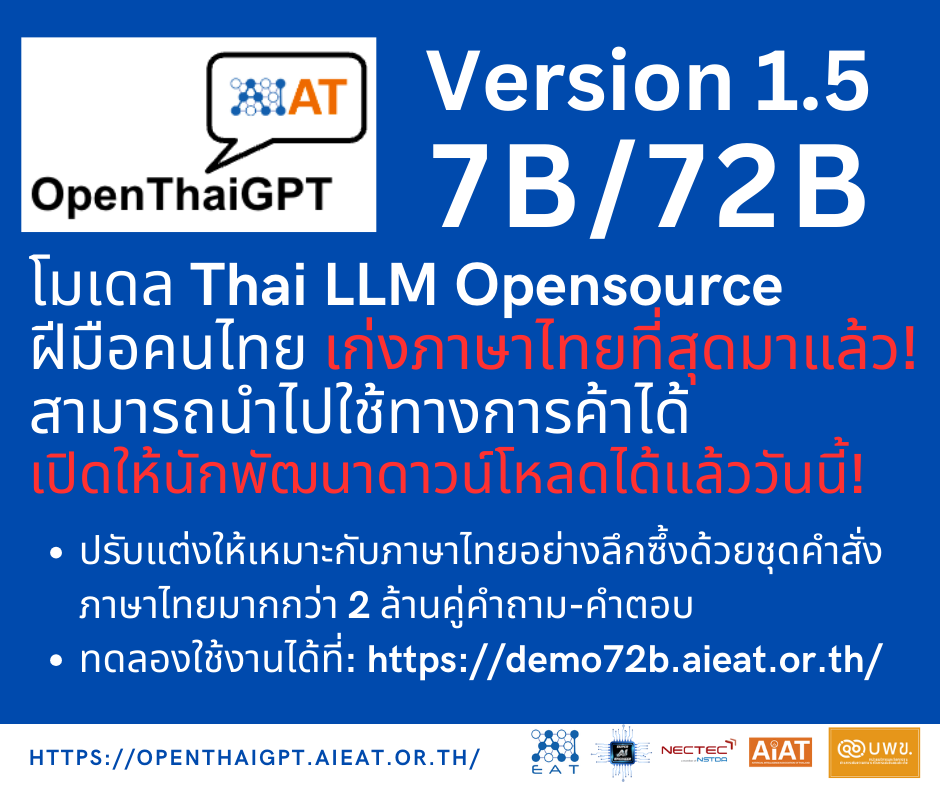
Poster เปิดตัว 7/72b ณ วันที่ 30 กันยายน
Online Demo
OpenThaiGPT 1.5 72b Online Demodemo72b.aieat.or.th
Hosted by Siam.AI Cloud 
Free Online API Service
Free API Service via OpenAI's client library openai
- API Base: https://api.float16.cloud/dedicate/78y8fJLuzE/v1/
- API Key: float16-AG0F8yNce5s1DiXm1ujcNrTaZquEdaikLwhZBRhyZQNeS7Dv0X
- Model: openthaigpt/openthaigpt1.5-7b-instruct
- Code Example: OpenThaiGPT/openthaigpt1.5_api_examples
Hosted by Float16.cloud

ดาวน์โหลดโมเดล (Latest Update: 13 October 2024)
- 7b - openthaigpt/openthaigpt1.5-7b-instruct
- 14b - openthaigpt/openthaigpt1.5-14b-instruct
- 72b - openthaigpt/openthaigpt1.5-72b-instruct
จุดเด่น
- โมเดล LLM ภาษาไทยที่ทันสมัยที่สุด ซึ่งทำคะแนนเฉลี่ยสูงสุดในการทดสอบภาษาไทยหลากหลายประเภทเมื่อเปรียบเทียบกับโมเดล LLM ภาษาไทยแบบโอเพนซอร์ซอื่นๆ
- รองรับการสนทนาแบบหลายรอบ สำหรับการสนทนาต่อเนื่อง
- รองรับการสร้างการตอบสนองแบบ Retrieval Augmented Generation (RAG) เพื่อเพิ่มประสิทธิภาพในการสร้างคำตอบ
- ความสามารถในการจัดการบริบทที่น่าประทับใจ: ประมวลผลข้อความได้สูงสุด 131,072 โทเคน และสร้างข้อความได้สูงสุด 8,192 โทเคน ทำให้สามารถตอบคำถามที่ซับซ้อนได้อย่างละเอียด
- รองรับการเรียกใช้เครื่องมือ (Tool Calling): ช่วยให้ผู้ใช้สามารถสั่งให้โมเดลเรียกใช้ฟังก์ชันต่างๆ อาทิเช่นเรียก API จากภายนอก, ดึงข้อมูลจาก Internet, ดึงข้อมูลจากฐานข้อมูลต่างๆ ได้อย่างมีประสิทธิภาพผ่านการตอบสนองอัจฉริยะ
ผลการทดสอบที่ OpenThaiGPT Eval
7 พันล้านพารามิเตอร์ (7 billions)
กรุณาดูที่ openthaigpt/openthaigpt1.5-7b-instruct สำหรับผลการประเมินของโมเดลนี้
| ชื่อการสอบ | scb10x/llama-3-typhoon-v1.5x-8b-instruct | meta-llama/Llama-3.1-7B-Instruct | Qwen/Qwen2.5-7B-Instruct_stat | openthaigpt/openthaigpt1.5-7b |
|---|---|---|---|---|
| 01_a_level | 46.67% | 47.50% | 58.33% | 60.00% |
| 02_tgat | 32.00% | 36.00% | 32.00% | 36.00% |
| 03_tpat1 | 52.50% | 55.00% | 57.50% | 57.50% |
| 04_investment_consult | 56.00% | 48.00% | 68.00% | 76.00% |
| 05_facebook_beleble_th_200 | 78.00% | 73.00% | 79.00% | 81.00% |
| 06_xcopa_th_200 | 79.50% | 69.00% | 80.50% | 81.00% |
| 07_xnli2.0_th_200 | 56.50% | 55.00% | 53.00% | 54.50% |
| 08_onet_m3_thai | 48.00% | 32.00% | 72.00% | 64.00% |
| 09_onet_m3_social | 75.00% | 50.00% | 90.00% | 80.00% |
| 10_onet_m3_math | 25.00% | 18.75% | 31.25% | 31.25% |
| 11_onet_m3_science | 46.15% | 42.31% | 46.15% | 46.15% |
| 12_onet_m3_english | 70.00% | 76.67% | 86.67% | 83.33% |
| 13_onet_m6_thai | 47.69% | 29.23% | 46.15% | 53.85% |
| 14_onet_m6_math | 29.41% | 17.65% | 29.41% | 29.41% |
| 15_onet_m6_social | 50.91% | 43.64% | 56.36% | 58.18% |
| 16_onet_m6_science | 42.86% | 32.14% | 57.14% | 57.14% |
| 17_onet_m6_english | 65.38% | 71.15% | 78.85% | 80.77% |
| ค่าเฉลี่ยย่อย | 60.65% | 55.60% | 64.41% | 65.78% |
14 พันล้านพารามิเตอร์ (14 billions)
Please take a look at openthaigpt/openthaigpt1.5-14b-instruct for this model's evaluation result.
| Exam names | scb10x/llama-3-typhoon-v1.5x-70b-instruct | Qwen/Qwen2.5-14B-Instruct | openthaigpt/openthaigpt1.5-14b | openthaigpt/openthaigpt1.5-72b |
|---|---|---|---|---|
| 01_a_level | 59.17% | 61.67% | 65.00% | 76.67% |
| 02_tgat | 46.00% | 44.00% | 50.00% | 46.00% |
| 03_tpat1 | 52.50% | 60.00% | 52.50% | 55.00% |
| 04_investment_consult | 60.00% | 76.00% | 72.00% | 72.00% |
| 05_facebook_beleble_th_200 | 87.50% | 84.50% | 87.00% | 90.00% |
| 06_xcopa_th_200 | 84.50% | 85.00% | 86.50% | 90.50% |
| 07_xnli2.0_th_200 | 62.50% | 69.50% | 64.50% | 70.50% |
| 08_onet_m3_thai | 76.00% | 76.00% | 84.00% | 84.00% |
| 09_onet_m3_social | 95.00% | 90.00% | 90.00% | 95.00% |
| 10_onet_m3_math | 43.75% | 43.75% | 12.50% | 37.50% |
| 11_onet_m3_science | 53.85% | 50.00% | 53.85% | 73.08% |
| 12_onet_m3_english | 93.33% | 93.33% | 93.33% | 96.67% |
| 13_onet_m6_thai | 55.38% | 52.31% | 56.92% | 56.92% |
| 14_onet_m6_math | 41.18% | 23.53% | 41.18% | 41.18% |
| 15_onet_m6_social | 67.27% | 60.00% | 61.82% | 65.45% |
| 16_onet_m6_science | 50.00% | 50.00% | 57.14% | 67.86% |
| 17_onet_m6_english | 73.08% | 82.69% | 78.85% | 90.38% |
| Micro Average | 69.97% | 71.00% | 71.51% | 76.73% |
72 พันล้านพารามิเตอร์ (72 billions)
กรุณาดูที่ openthaigpt/openthaigpt1.5-72b-instruct สำหรับผลการประเมินของโมเดลนี้
| Exam names | scb10x/llama-3-typhoon-v1.5x-70b-instruct | meta-llama/Llama-3.1-70B-Instruct | Qwen/Qwen2.5-72B-Instruct | openthaigpt/openthaigpt1.5-72b-instruct |
|---|---|---|---|---|
| 01_a_level | 59.17% | 61.67% | 75.00% | 76.67% |
| 02_tgat | 46.00% | 40.00% | 48.00% | 46.00% |
| 03_tpat1 | 52.50% | 50.00% | 55.00% | 55.00% |
| 04_investment_consult | 60.00% | 52.00% | 80.00% | 72.00% |
| 05_facebook_beleble_th_200 | 87.50% | 88.00% | 90.00% | 90.00% |
| 06_xcopa_th_200 | 84.50% | 85.50% | 90.00% | 90.50% |
| 07_xnli2.0_th_200 | 62.50% | 63.00% | 65.50% | 70.50% |
| 08_onet_m3_thai | 76.00% | 56.00% | 76.00% | 84.00% |
| 09_onet_m3_social | 95.00% | 95.00% | 90.00% | 95.00% |
| 10_onet_m3_math | 43.75% | 25.00% | 37.50% | 37.50% |
| 11_onet_m3_science | 53.85% | 61.54% | 65.38% | 73.08% |
| 12_onet_m3_english | 93.33% | 93.33% | 96.67% | 96.67% |
| 13_onet_m6_thai | 55.38% | 60.00% | 60.00% | 56.92% |
| 14_onet_m6_math | 41.18% | 58.82% | 23.53% | 41.18% |
| 15_onet_m6_social | 67.27% | 76.36% | 63.64% | 65.45% |
| 16_onet_m6_science | 50.00% | 57.14% | 64.29% | 67.86% |
| 17_onet_m6_english | 73.08% | 82.69% | 86.54% | 90.38% |
| Micro Average | 69.97% | 71.09% | 75.02% | 76.73% |
การทดสอบในข้อสอบปรนัยภาษาไทย ชุดทดสอบใหม่ที่ไม่เคยเห็นมาก่อน การเรียนรู้แบบศูนย์ช็อต รหัสต้นฉบับและข้อมูลการสอบ: OpenThaiGPT/openthaigpt_eval บน GitHub
(อัปเดตเมื่อ: 30 กันยายน 2024)
ผลการทดสอบที่ scb10x/thai_exam
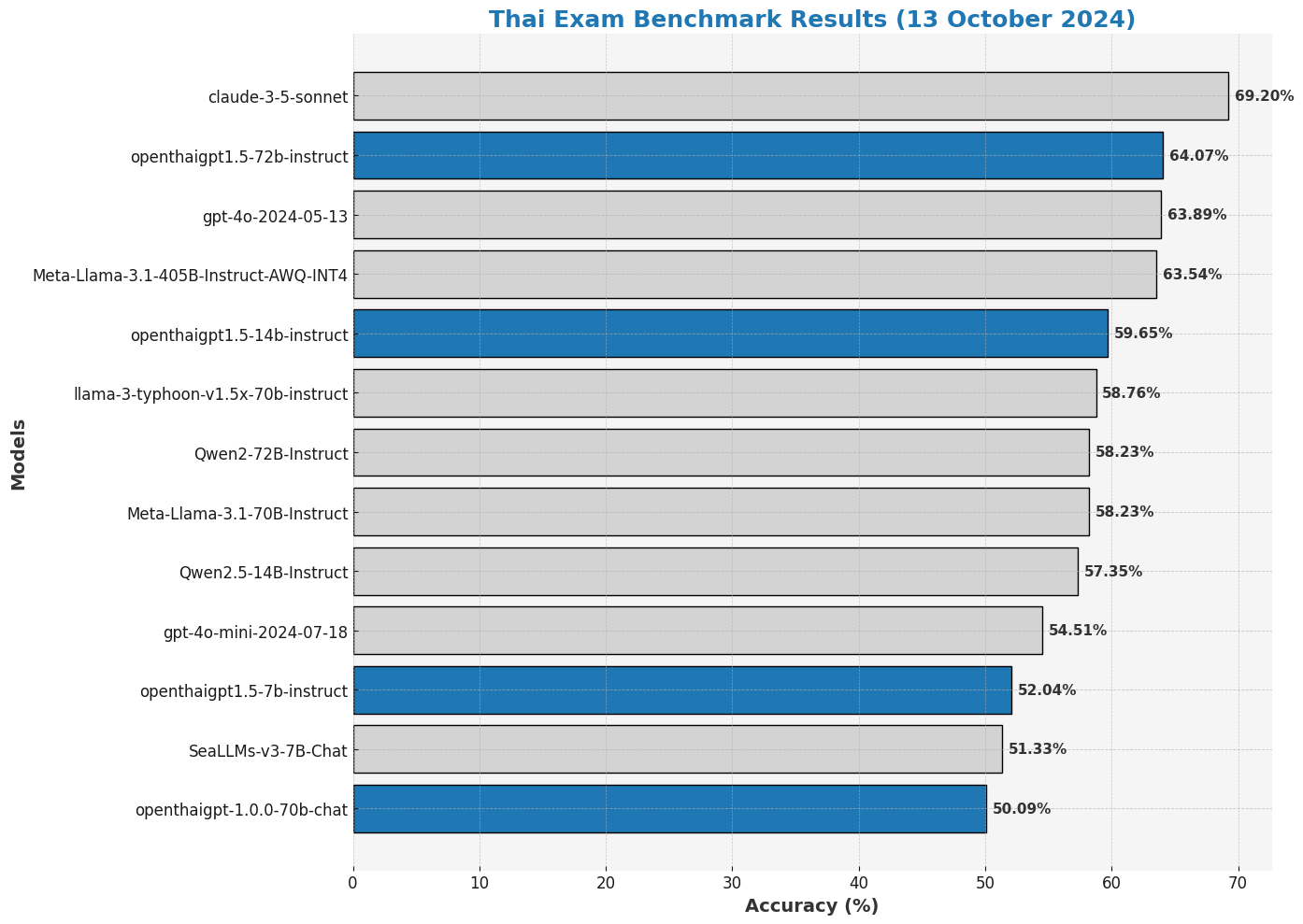
| โมเดล | การทดสอบภาษาไทย (Acc) |
|---|---|
| api/claude-3-5-sonnet-20240620 | 69.2 |
| openthaigpt/openthaigpt1.5-72b-instruct* | 64.07 |
| api/gpt-4o-2024-05-13 | 63.89 |
| hugging-quants/Meta-Llama-3.1-405B-Instruct-AWQ-INT4 | 63.54 |
| openthaigpt/openthaigpt1.5-14b-instruct* | 59.65 |
| scb10x/llama-3-typhoon-v1.5x-70b-instruct | 58.76 |
| Qwen/Qwen2-72B-Instruct | 58.23 |
| meta-llama/Meta-Llama-3.1-70B-Instruct | 58.23 |
| Qwen/Qwen2.5-14B-Instruct | 57.35 |
| api/gpt-4o-mini-2024-07-18 | 54.51 |
| openthaigpt/openthaigpt1.5-7b-instruct* | 52.04 |
| SeaLLMs/SeaLLMs-v3-7B-Chat | 51.33 |
| openthaigpt/openthaigpt-1.0.0-70b-chat | 50.09 |
* การประเมินโดยทีม OpenThaiGPT โดยใช้ scb10x/thai_exam
ใบอนุญาต
- สร้างขึ้นด้วย Qwen
- ใบอนุญาต Qwen: อนุญาตให้ใช้ใน งานวิจัย และ เชิงพาณิชย์ แต่หากผู้ใช้ของคุณมีจำนวนผู้ใช้งานต่อเดือนเกิน 100 ล้านคน คุณจำเป็นต้องเจรจาใบอนุญาตเชิงพาณิชย์แยกต่างหาก กรุณาดูไฟล์ LICENSE สำหรับข้อมูลเพิ่มเติม
ผู้สนับสนุน

Prompt Format
Prompt format is based on Llama2 with a small modification (Adding "###" to specify the context part)
<|im_start|>system\n{sytem_prompt}<|im_end|>\n<|im_start|>user\n{prompt}<|im_end|>\n<|im_start|>assistant\n
System prompt
คุณคือผู้ช่วยตอบคำถามที่ฉลาดและซื่อสัตย์
Examples
Single Turn Conversation Example
<|im_start|>system\nคุณคือผู้ช่วยตอบคำถามที่ฉลาดและซื่อสัตย์<|im_end|>\n<|im_start|>user\nสวัสดีครับ<|im_end|>\n<|im_start|>assistant\n
Single Turn Conversation with Context (RAG) Example
<|im_start|>system\nคุณคือผู้ช่วยตอบคำถามที่ฉลาดและซื่อสัตย์<|im_end|>\n<|im_start|>user\nกรุงเทพมหานคร เป็นเมืองหลวง นครและมหานครที่มีประชากรมากที่สุดของประเทศไทย กรุงเทพมหานครมีพื้นที่ทั้งหมด 1,568.737 ตร.กม. มีประชากรตามทะเบียนราษฎรกว่า 8 ล้านคน\nกรุงเทพมหานครมีพื้นที่เท่าไร่<|im_end|>\n<|im_start|>assistant\n
Multi Turn Conversation Example
First turn
<|im_start|>system\nคุณคือผู้ช่วยตอบคำถามที่ฉลาดและซื่อสัตย์<|im_end|>\n<|im_start|>user\nสวัสดีครับ<|im_end|>\n<|im_start|>assistant\n
Second turn
<|im_start|>system\nคุณคือผู้ช่วยตอบคำถามที่ฉลาดและซื่อสัตย์<|im_end|>\n<|im_start|>user\nสวัสดีครับ<|im_end|>\n<|im_start|>assistant\nสวัสดีครับ ยินดีต้อนรับครับ คุณต้องการให้ฉันช่วยอะไรครับ?<|im_end|>\n<|im_start|>user\nกรุงเทพมหานคร ชื่อเต็มยาวๆคืออะไร<|im_end|>\n<|im_start|>assistant\n
ชื่อเต็มของกรุงเทพมหานครคือ "กรุงเทพมหานคร อมรรัตนโกสินทร์ มหินทรายุธยา มหาดิลกภพ นพรัตนราชธานีบูรีรมย์ อุดมราชนิเวศน์มหาสถาน อมรพิมานอวตารสถิต สักกะทัตติยวิษณุกรรมประสิทธิ์"
Result
<|im_start|>system\nคุณคือผู้ช่วยตอบคำถามที่ฉลาดและซื่อสัตย์<|im_end|>\n<|im_start|>user\nสวัสดีครับ<|im_end|>\n<|im_start|>assistant\nสวัสดีครับ ยินดีต้อนรับครับ คุณต้องการให้ฉันช่วยอะไรครับ?<|im_end|>\n<|im_start|>user\nกรุงเทพมหานคร ชื่อเต็มยาวๆคืออะไร<|im_end|>\n<|im_start|>assistant\nชื่อเต็มของกรุงเทพมหานครคือ \"กรุงเทพมหานคร อมรรัตนโกสินทร์ มหินทรายุธยา มหาดิลกภพ นพรัตนราชธานีบูรีรมย์ อุดมราชนิเวศน์มหาสถาน อมรพิมานอวตารสถิต สักกะทัตติยวิษณุกรรมประสิทธิ์\"
How to use
Free API via Curl (Hosted by Siam.AI and Float16.Cloud)
Siam.AI
curl https://api.aieat.or.th/v1/completions \
  -H "Content-Type: application/json" \
  -H "Authorization: Bearer dummy" \
  -d '{
    "model": ".",
    "prompt": "<|im_start|>system\nคุณคือผู้ช่วยตอบคำถามที่ฉลาดและซื่อสัตย์<|im_end|>\n<|im_start|>user\nกรุงเทพมหานครคืออะไร<|im_end|>\n<|im_start|>assistant\n",
    "max_tokens": 512,
    "temperature": 0.7,
    "top_p": 0.8,
    "top_k": 40,
    "stop": ["<|im_end|>"]
  }'
Float16.cloud
curl -X POST https://api.float16.cloud/dedicate/78y8fJLuzE/v1/chat/completions \
  -H "Content-Type: application/json" \
  -H "Authorization: Bearer float16-AG0F8yNce5s1DiXm1ujcNrTaZquEdaikLwhZBRhyZQNeS7Dv0X" \
  -d '{
    "model": "openthaigpt/openthaigpt1.5-7b-instruct",
    "messages": [
      {
        "role": "system",
        "content": "คุณคือผู้ช่วยตอบคำถามที่ฉลาดและซื่อสัตย์"
      },
      {
        "role": "user",
        "content": "สวัสดี"
      }
    ]
   }'
OpenAI client (hosted by vLLM, please see below.)
import openai

# Configure OpenAI client to use vLLM server
openai.api_base = "http://127.0.0.1:8000/v1"
openai.api_key = "dummy"  # vLLM doesn't require a real API key

prompt = "<|im_start|>system\nคุณคือผู้ช่วยตอบคำถามที่ฉลาดและซื่อสัตย์<|im_end|>\n<|im_start|>user\nกรุงเทพมหานครคืออะไร<|im_end|>\n<|im_start|>assistant\n"

try:
    response = openai.Completion.create(
        model=".",  # Specify the model you're using with vLLM
        prompt=prompt,
        max_tokens=512,
        temperature=0.7,
        top_p=0.8,
        top_k=40,
        stop=["<|im_end|>"]
    )
    print("Generated Text:", response.choices[0].text)
except Exception as e:
    print("Error:", str(e))
Huggingface
from transformers import AutoModelForCausalLM, AutoTokenizer

model_name = "openthaigpt/openthaigpt1.5-72b-instruct"

model = AutoModelForCausalLM.from_pretrained(
    model_name,
    torch_dtype="auto",
    device_map="auto"
)
tokenizer = AutoTokenizer.from_pretrained(model_name)

prompt = "ประเทศไทยคืออะไร"
messages = [
    {"role": "system", "content": "คุณคือผู้ช่วยตอบคำถามที่ฉลาดและซื่อสัตย์"},
    {"role": "user", "content": prompt}
]
text = tokenizer.apply_chat_template(
    messages,
    tokenize=False,
    add_generation_prompt=True
)
model_inputs = tokenizer([text], return_tensors="pt").to(model.device)

generated_ids = model.generate(
    **model_inputs,
    max_new_tokens=512
)
generated_ids = [
    output_ids[len(input_ids):] for input_ids, output_ids in zip(model_inputs.input_ids, generated_ids)
]

response = tokenizer.batch_decode(generated_ids, skip_special_tokens=True)[0]
vLLM
- Install VLLM (https://github.com/vllm-project/vllm)
- Run server
vllm serve openthaigpt/openthaigpt1.5-72b-instruct --tensor-parallel-size 4
- Run inference (CURL example)
curl -X POST 'http://127.0.0.1:8000/v1/completions' \
-H 'Content-Type: application/json' \
-d '{
  "model": ".",
  "prompt": "<|im_start|>system\nคุณคือผู้ช่วยตอบคำถามที่ฉลาดและซื่อสัตย์<|im_end|>\n<|im_start|>user\nสวัสดีครับ<|im_end|>\n<|im_start|>assistant\n",
  "max_tokens": 512,
  "temperature": 0.7,
  "top_p": 0.8,
  "top_k": 40,
  "stop": ["<|im_end|>"]
}'
Processing Long Texts
The current config.json is set for context length up to 32,768 tokens. To handle extensive inputs exceeding 32,768 tokens, we utilize YaRN, a technique for enhancing model length extrapolation, ensuring optimal performance on lengthy texts.
For supported frameworks, you could add the following to config.json to enable YaRN:
{
  ...
  "rope_scaling": {
    "factor": 4.0,
    "original_max_position_embeddings": 32768,
    "type": "yarn"
  }
}
Tool Calling
The Tool Calling feature in OpenThaiGPT 1.5 enables users to efficiently call various functions through intelligent responses. This includes making external API calls to retrieve real-time data, such as current temperature information, or predicting future data simply by submitting a query.
For example, a user can ask OpenThaiGPT, “What is the current temperature in San Francisco?” and the AI will execute a pre-defined function to provide an immediate response without the need for additional coding.
This feature also allows for broader applications with external data sources, including the ability to call APIs for services such as weather updates, stock market information, or data from within the user’s own system.
Example:
import openai

def get_temperature(location, date=None, unit="celsius"):
    """Get temperature for a location (current or specific date)."""
    if date:
        return {"temperature": 25.9, "location": location, "date": date, "unit": unit}
    return {"temperature": 26.1, "location": location, "unit": unit}

tools = [
    {
        "name": "get_temperature",
        "description": "Get temperature for a location (current or by date).",
        "parameters": {
            "location": "string", "date": "string (optional)", "unit": "enum [celsius, fahrenheit]"
        },
    }
]

messages = [{"role": "user", "content": "อุณหภูมิที่ San Francisco วันนี้ีและพรุ้่งนี้คือเท่าไร่?"}]

# Simulated response flow using OpenThaiGPT Tool Calling
response = openai.ChatCompletion.create(
    model=".", messages=messages, tools=tools, temperature=0.7, max_tokens=512
)

print(response)
Full example: api_tool_calling_powered_by_siamai.py — GitHub
GPU Memory Requirements
| Number of Parameters | FP 16 bits | 8 bits (Quantized) | 4 bits (Quantized) | Example Graphic Card for 4 bits |
|---|---|---|---|---|
| 7b | 24 GB | 12 GB | 6 GB | Nvidia RTX 4060 8GB |
| 13b | 48 GB | 24 GB | 12 GB | Nvidia RTX 4070 16GB |
| 72b | 192 GB | 96 GB | 48 GB | Nvidia RTX 4090 24GB x 2 cards |
Authors
- Sumeth Yuenyong (sumeth.yue@mahidol.edu)
- Kobkrit Viriyayudhakorn (kobkrit@aieat.or.th)
- Apivadee Piyatumrong (apivadee.piy@nectec.or.th)
- Jillaphat Jaroenkantasima (autsadang41@gmail.com)
- Thaweewat Rugsujarit (thaweewr@scg.com)
- Norapat Buppodom (new@norapat.com)
- Koravich Sangkaew (kwankoravich@gmail.com)
- Peerawat Rojratchadakorn (peerawat.roj@gmail.com)
- Surapon Nonesung (nonesungsurapon@gmail.com)
- Chanon Utupon (chanon.utupon@gmail.com)
- Sadhis Wongprayoon (sadhis.tae@gmail.com)
- Nucharee Thongthungwong (nuchhub@hotmail.com)
- Chawakorn Phiantham (mondcha1507@gmail.com)
- Patteera Triamamornwooth (patt.patteera@gmail.com)
- Nattarika Juntarapaoraya (natt.juntara@gmail.com)
- Kriangkrai Saetan (kraitan.ss21@gmail.com)
- Pitikorn Khlaisamniang (pitikorn32@gmail.com)
Citation
If OpenThaiGPT has been beneficial for your work, kindly consider citing it as follows:
Bibtex
@misc{yuenyong2024openthaigpt15thaicentricopen,
      title={OpenThaiGPT 1.5: A Thai-Centric Open Source Large Language Model},
      author={Sumeth Yuenyong and Kobkrit Viriyayudhakorn and Apivadee Piyatumrong and Jillaphat Jaroenkantasima},
      year={2024},
      eprint={2411.07238},
      archivePrefix={arXiv},
      primaryClass={cs.CL},
      url={https://arxiv.org/abs/2411.07238},
}
APA Style (for TXT, MS Word)
Yuenyong, S., Viriyayudhakorn, K., Piyatumrong, A., & Jaroenkantasima, J. (2024). OpenThaiGPT 1.5: A Thai-Centric Open Source Large Language Model. arXiv [Cs.CL]. Retrieved from http://arxiv.org/abs/2411.07238
Disclaimer: Provided responses are not guaranteed.